- Página de inicio /
- Electrónica /
- Computer Accessories /
- Computer Accessories & Peripherals /
- Keyboards, Mice & Accessories /
- Computer Keyboards /
- Dell Keyboard
0 ratings




Nº de artículo:
33276098
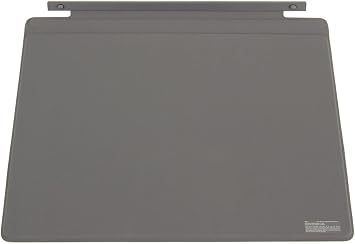
Dell Keyboard
Nº de artículo:
33276098
USD 73
Price Details
Excluding Shipping & Custom charges ( Shipping and custom charges will be calculated on checkout )
*All items will import from Estados Unidos
0 ratings
Escribe una opinión
En stock
 Importado de la tienda USA
QTY:
Haz tu pedido ahora y recíbelo por ahí Miércoles, Julio 22
Secured transaction
Ubuy works hard to protect your security and privacy. Our advanced payment security system ensures confidentiality by encrypting your information during transmission using AES (Advanced Encryption Standards) and SSL (Secure Socket Layer) protocols. Your payment details are 100% secure as we do not share your payment details with third party sellers.
Our Top Logistics Partners


Create a laptop-like experience with the Mobile/Travel Keyboard Dock for the Dell Latitude 7200 2-in-1 tablet system.

Fast
Shipping

Free
Return*

Secure Packaging

100% Original Products

PCI DSS Compliance

ISO 27001 Certified


What Stands Out
Ergonomic Design
The Dell Keyboard features an ergonomic design that promotes comfortable typing, reducing strain during long usage sessions, making it perfect for professionals and gamers alike.
Customizable Keys
With customizable key functions, users can personalize their typing experience, enhancing productivity and efficiency tailored to their specific needs.
Durability
Constructed with high-quality materials, the Dell Keyboard ensures longevity and resilience against wear and tear, providing excellent value for users seeking reliability.
Detalles de producto
- This is a Genuine Dell OEM part.
- You will receive exactly what is pictured.
- COMPATIBLE DELL COMPUTERS: Accessories Mouse / Keyboard, Latitude 7200 2-in-1, Latitude 7210 2-in-1
| Compatible Devices | Dell Computers |
| Connectivity Technology | Bluetooth |
| Additional Features | 24D3M |
| Keyboard Backlighting Color Support | Single Color |
| Power Source | Wired |
| Keyboard Layout | QWERTY |
| Hand Orientation | Ambidextrous |
| Button Quantity | 78 |
| Minimum Required Operating System Version | Windows 10 |
| Compatible Operating System Family | Windows |
| Processor Count | 1 |
| Number of Keys | 104 |
| Number of Sections | 1 |
| Color | Black |
| Style Name | Classic |
| Brand | Dell |
| Keyboard Description | Macro |
| Antenna Location | Everyday Use |
| Built-In Media | Keyboard |
| Model Number | AG00-BK-US |
| Series Number | 7200 |
| Unit Count | 1.0 Count |
| Manufacturer | Dell |
| UPC | 884116325994 |
| Mfr Part Number | AG00-BK-US |
| Enclosure Material | Acrylonitrile Butadiene Styrene |
| Recommended Uses For Product | Everyday Use |
| Special Feature | 24D3M |
| Keyboard backlighting color support | Single Color |
| Style | Classic |
| Material | Acrylonitrile Butadiene Styrene |
| Package Weight | 4.52 Pound |
What's in the box
Keyboard
Who Should Buy?

-
Office Workers
Ideal for office environments due to comfortable typing experience and ergonomic design, boosting productivity during long hours.
-
Gaming Enthusiasts
Features responsive keys and customizable layouts, enhancing gaming performance for competitive and casual gamers alike.
-
Students
Compact and durable design makes it suitable for academic use, facilitating comfortable typing during assignments and projects.

-
Professional Programmers
Limited programmable keys may not meet specific needs for coding shortcuts and advanced macros preferred by developers.
-
Frequent Travelers
Bulky design makes it less portable, posing challenges for users who need a keyboard for travel or mobile work.
-
Design Professionals
Lacks specialized features such as customizable RGB lighting or creative shortcuts favored by graphic designers and artists.
DESCRIPCIÓN DEL PRODUCTO
¿Tienes alguna consulta? Chatea con nosotros
Preguntas y respuestas de los clientes
-
Pregunta:
What types of Dell Keyboards are available?
Respuesta: Dell offers a variety of keyboards including wired, wireless, and mechanical options. Each type caters to different user preferences, such as typing style and workspace requirements. For instance, if you're a gamer, you might prefer a mechanical keyboard for its tactile feedback, whereas a wireless option is great for a clutter-free workspace. Dell keyboards also come with various features, including programmable keys, backlighting, and ergonomic designs, ensuring comfort during extended use. -
Pregunta:
Are Dell Keyboards compatible with all operating systems?
Respuesta: Most Dell Keyboards are designed to be compatible with popular operating systems like Windows, macOS, and Linux. To ensure full functionality, it is advisable to check the specific model's compatibility before purchasing. Dell utilizes universal interface standards such as USB and Bluetooth, which makes it easier for users to integrate the keyboard into their existing setup effortlessly. This means whether you're typing on a desktop or a laptop, you can expect seamless integration and performance. -
Pregunta:
What are the advantages of a wireless Dell Keyboard?
Respuesta: A wireless Dell Keyboard offers a range of advantages, including freedom from cable clutter and increased mobility. This is particularly beneficial for users who work in spacious environments or those who enjoy flexibility in their workspace setups. Additionally, many wireless models feature power-saving technologies, extending battery life significantly. Consider a wireless keyboard if you frequently switch between devices or need a tidy workspace without the hassle of tangled cords. -
Pregunta:
How do I maintain my Dell Keyboard for longevity?
Respuesta: To prolong the lifespan of your Dell Keyboard, regular cleaning is essential. Use a soft cloth and a mild cleaning solution to wipe down the keys and surface. Additionally, avoid eating or drinking near the keyboard to prevent debris buildup. If possible, periodically disconnect and inspect the keyboard for any stuck keys or dirt accumulation. Taking these precautionary steps helps ensure optimal performance and keeps your typing experience enjoyable. -
Pregunta:
Can Dell Keyboards be customized for gaming?
Respuesta: Yes, certain Dell Keyboards come with customizable features tailored for gaming, such as programmable macro keys and RGB backlighting. By downloading Dell’s software, users can assign specific commands to keys, enhancing gameplay efficiency and personalization. This customization is beneficial for gamers who need quick access to complex actions during play. Such features not only improve performance but also allow for a aesthetic that resonates with the user’s gaming setup. -
Pregunta:
What is the ergonomic design feature in Dell Keyboards?
Respuesta: Dell Keyboards often feature ergonomic designs that help reduce strain during prolonged typing sessions. This includes split layouts, tiltable bases, and cushioned palm rests, which promote a more natural hand position. The ergonomic layout is particularly advantageous for professionals spending hours at their desks, as it helps minimize discomfort and potential injuries. Choosing an ergonomic model can greatly enhance your typing comfort and productivity. -
Pregunta:
What features should I look for in a Dell Keyboard for professional use?
Respuesta: When choosing a Dell Keyboard for professional use, consider features like key feedback, layout, and additional functionalities. A tactile feedback and a full-sized layout enhance typing accuracy and speed. Look for options with dedicated media controls for easy access to volume and playback functions. If you frequently work in low-light conditions, a backlit keyboard can provide significant convenience. These features can enhance your productivity and overall work experience. -
Pregunta:
Is there a difference between Dell's business and consumer keyboards?
Respuesta: Yes, Dell's business keyboards are often designed for durability and enhanced functionality tailored for professional environments. They typically emphasize ergonomic features, multi-device connectivity, and advanced connectivity options. In contrast, consumer keyboards may focus more on aesthetics and customizable RGB lighting. If you seek reliability and comfort for extended work hours, a business model may be more suitable for your needs. -
Pregunta:
Where can I buy a Dell Keyboard in Puerto Rico?
Respuesta: You can buy a Dell Keyboard in Puerto Rico through Ubuy, which provides a comprehensive selection of Dell products. Ubuy offers various models, enabling you to find the right keyboard that fits your requirements. They often feature detailed product descriptions and customer reviews to help you make an informed choice. Ubuy is a trusted platform for acquiring authentic Dell products safely and efficiently. -
Pregunta:
What are some common issues with Dell Keyboards and how can I fix them?
Respuesta: Common issues with Dell Keyboards may include unresponsive keys or connectivity problems. For unresponsive keys, try cleaning the keyboard to remove debris or restart your computer to reset connections. If you're facing Bluetooth connectivity problems with a wireless model, check if the battery needs replacement or ensure that your device's Bluetooth is active. Troubleshooting these issues can restore functionality quickly and improve your overall typing experience.
Dell Keyboards AG00-BK-US Editorial Review


No se encontraron reseñas editoriales
Customer Reviews & Ratings
239 valoraciones de los clientes
-
5 estrella
73%
-
4 estrella
10%
-
3 estrella
7%
-
2 estrella
2%
-
1 estrella
8%
Revisar este producto
Comparte tus ideas con otros clientes
Platform Trust & Buyer Confidence

MT
Mohd
Verified buyer
“The product received very good packaging & safe…Thank You”
16 June 2026 · via Trustpilot
SJ
Shawati
Verified buyer
“Accurate delivery timing given”
16 June 2026 · via Trustpilot
YB
Youcef
Verified buyer
“Not madly expensive like I thought, and much quicker than promised.”
15 June 2026 · via Trustpilot
LM
Leila
Verified buyer
“Never dealt with Ubuy before, but everything worked out great. Seamless cross border purchasing and shipping. Thanks!”
6/7/2026 · via Trustpilot
KA
Kwame
Verified buyer
“The process was smooth, with clear communication and timelines. This was my 1st purchase and I am really impressed. I will definitely be coming back.”
12 June 2026 · via Trustpilot
Pago seguro
Global Delivery
Easy Returns
Genuine Products
Related Categories
Related Brands
Product Price History
Información importante
- Limitaciones: Para los productos enviados al extranjero, ten en cuenta que cualquier garantía del fabricante puede no ser válida; las opciones de servicio del fabricante pueden no estar disponibles; los manuales del producto, las instrucciones y las advertencias de seguridad pueden no estar en los idiomas del país de destino; los productos (y los materiales que los acompañan) pueden no estar diseñados de acuerdo con las normas, especificaciones y requisitos de etiquetado del país de destino; y los productos pueden no ajustarse al voltaje del país de destino y a otras normas eléctricas (lo que requiere el uso de un adaptador o convertidor, si procede). El destinatario es responsable de asegurarse de que el producto puede ser importado legalmente al país de destino. Cuando hagas un pedido a Ubuy o a sus filiales, el destinatario es el importador registrado y debe cumplir todas las leyes y normativas del país de destino.
- No todos los productos que aparecen en Ubuy están a la venta, ya que Ubuy es un motor de búsqueda a nivel mundial. Los productos están sujetos a las normas de exportación/comercio.
USD 73
Haz tu pedido ahora y recíbelo por ahí Miércoles, Julio 22
This item is not restrict in my country.(Please click on above link if this item is not restrict in your country, So our team will review and allow.)
QTY:
Secured transaction
PCI DSS compliant and ISO 27001:2022 certified, with encrypted payments and full buyer protection on every order.
Our Top Logistics Partners
Fastest cross-border delivery
características y beneficios
- Transforms your Dell Latitude 7200 2-in-1 into a laptop.
- Includes a full keyboard for easy typing.
- Equipped with a touchpad for enhanced navigation.
- Genuine Dell OEM part ensures high quality.
- Compatible with Latitude 7200 and 7210 2-in-1 models.
- Compact and portable design for travel convenience.
Ubuy Assurance
Experience worry-free shopping with 100% original products, PCI DSS-compliant payment security, ISO 27001-certified data protection, the fastest cross-border delivery, free returns *, and secure packaging on every order.