0 ratings

Nº de artículo:
39541555
BEYEE Zero Delay Arcade USB Encoder PC to Joystick For MAME & Raspberry Pi Retropie Projects (2Pin+4.8mm)
Nº de artículo:
39541555
USD 19
Price Details
Excluding Shipping & Custom charges ( Shipping and custom charges will be calculated on checkout )
*All items will import from Estados Unidos
0 ratings
Escribe una opinión
En stock
 Importado de la tienda USA
QTY:
Haz tu pedido ahora y recíbelo por ahí Sunday, Julio 26
Secured transaction
Ubuy works hard to protect your security and privacy. Our advanced payment security system ensures confidentiality by encrypting your information during transmission using AES (Advanced Encryption Standards) and SSL (Secure Socket Layer) protocols. Your payment details are 100% secure as we do not share your payment details with third party sellers.
Our Top Logistics Partners


The Zero delay USB Pc Encoder is the most cost effective encoder option. Use this encoder set you can easily DIY your own arcade game machine.

Fast
Shipping

Free
Return*

Secure Packaging

100% Original Products

PCI DSS Compliance

ISO 27001 Certified


What Stands Out
Zero Delay Technology
Experience seamless gameplay with zero lag between your inputs and on-screen actions, enhancing the overall gaming experience for enthusiasts and retro gamers alike.
Universal Compatibility
Designed for MAME and Raspberry Pi projects, this encoder easily integrates with various arcade systems, ensuring versatility for DIY enthusiasts and hobbyists.
Easy Installation
The straightforward plug-and-play design simplifies setup, making it approachable for users of all skill levels to create their custom arcade gaming setup effortlessly.
Detalles de producto
| Item Weight | 0.5 lbs (230 grams) |
Who Should Buy?

-
Retro Gamers
Ideal for retro gamers looking to create custom arcade experiences using MAME or Raspberry Pi systems.
-
DIY Arcade Builders
Perfect for hobbyists constructing their own arcade cabinets, allowing easy connectivity of joysticks and buttons.
-
Technological Enthusiasts
Great for tech enthusiasts who enjoy hands-on projects and customizing their gaming setups with various controllers.

-
Casual Gamers
Not suitable for casual gamers who prefer plug-and-play solutions without technical modifications or setups.
-
Limited Skill Users
Users lacking technical skills may find installation and configuration challenging, hindering their gaming experience.
-
Professional Arcades
Not ideal for commercial arcade setups that require highly durable and advanced hardware for professional use.
DESCRIPCIÓN DEL PRODUCTO
BEYEE Zero Delay Arcade USB Encoder PC to Joystick For MAME & Raspberry Pi Retropie Projects (2Pin+4.8mm)
¿Tienes alguna consulta? Chatea con nosotros
Preguntas y respuestas de los clientes
-
Pregunta:
What is the BEYEE Zero Delay Arcade USB Encoder used for?
Respuesta: The BEYEE Zero Delay Arcade USB Encoder is used to connect arcade joystick and buttons to a PC or gaming console for projects like MAME or Raspberry Pi Retropie. This encoder converts the signals from your arcade components into USB inputs, making it ideal for vintage gaming setups. It is perfect for DIY enthusiasts who want to create custom arcade cabinets or gaming builds, offering a seamless connection for a responsive gaming experience. -
Pregunta:
Is the BEYEE encoder compatible with Mac and Linux?
Respuesta: Yes, the BEYEE Zero Delay Arcade USB Encoder is compatible with Mac and Linux systems, in addition to Windows PCs. Thanks to its basic USB HID profile, this encoder requires no additional drivers, allowing for plug-and-play use across different platforms. This versatility makes it a great choice for users wishing to set up retro gaming systems on multiple operating systems without encountering compatibility issues. -
Pregunta:
How do I set up the BEYEE Zero Delay Arcade USB Encoder?
Respuesta: To set up the BEYEE Zero Delay Arcade USB Encoder, simply connect your joystick and buttons to the encoder's terminals, following the labeling for each input. After this, plug the encoder into a USB port on your PC or Raspberry Pi. Upon connection, the device will automatically be recognized, allowing you to configure controls within your gaming software. This straightforward installation process is ideal for beginners as well as experienced gamers looking to personalize their arcade experience. -
Pregunta:
What types of arcade buttons and joysticks can I use with this encoder?
Respuesta: The BEYEE encoder is compatible with most standard arcade buttons and joysticks, particularly those that use a 2-pin, 4.8mm connection. This ensures versatility in your project, allowing you to select components that suit your gaming setup best. Whether you prefer traditional push buttons or unique joystick types, this encoder supports a wide array of arcade input devices, making it suitable for all types of arcade builds. -
Pregunta:
Can I use multiple encoders for a more extensive arcade setup?
Respuesta: Absolutely! You can connect multiple BEYEE Zero Delay Arcade USB Encoders to a single PC or Raspberry Pi to support a more extensive arcade setup. This is particularly handy for multiplayer arcade gaming, where you can assign different encoders for various players. Simply plug in additional encoders and configure the controls accordingly in your emulator or gaming software for a comprehensive gaming experience tailored to larger groups. -
Pregunta:
What makes the BEYEE encoder a good choice for retro gaming?
Respuesta: The BEYEE Zero Delay Arcade USB Encoder is designed with retro gaming in mind, as it delivers low-latency connections that enhance responsiveness. It allows users to replicate the classic arcade experience, providing the necessary inputs for arcade buttons and joysticks. For anyone looking to build a retro gaming machine or DIY arcade cabinet, this encoder is a reliable choice that captures the nostalgia of arcade gaming while ensuring performance. -
Pregunta:
Does the encoder support turbo functions for buttons?
Respuesta: Yes, the BEYEE Zero Delay Arcade USB Encoder supports turbo functions for buttons. This feature can be beneficial for games that require rapid button presses, allowing you to hold down a button for continuous input. It trains well for fighting games or action-packed titles where speed is essential for gameplay, providing an edge in competitive situations. -
Pregunta:
Is this encoder suitable for programmable features in gaming software?
Respuesta: The BEYEE Zero Delay Arcade USB Encoder allows for programming via gaming software that supports key mapping. This means you can assign some inputs to perform multiple functions or to emulate specific commands. The flexibility in programming makes it fit for various games, providing an enhanced gaming experience tailored to your preferences. -
Pregunta:
Where can I buy the BEYEE Zero Delay Arcade USB Encoder in Puerto Rico?
Respuesta: You can purchase the BEYEE Zero Delay Arcade USB Encoder from Ubuy in Puerto Rico. Ubuy provides a user-friendly shopping experience and a wide range of electronic products, ensuring you find what you need for your gaming projects. With Ubuy's efficient platform, you can easily explore various options and place your order confidently.
BEYEE Editorial Review
This product has been received quite positively, with customers using it for gaming, flight simulation controls and custom button boxes. It is easy to use, plug and play, with no coding knowledge required. Each board can hold up to twelve functions, and the simulator recognizes it as a game controller. Customers have even combined multiple boards to create more buttons. The board works well with a USB hub and does not have any delay issues. It is also noted for being good for MAME and other games. Some customers have mentioned that it cannot be modified for analog or potentiometers. Overall, the product is well priced, easy to install, and high quality.
Customer Reviews & Ratings
1 valoraciones de los clientes
-
5 estrella
100%
-
4 estrella
0%
-
3 estrella
0%
-
2 estrella
0%
-
1 estrella
0%
Revisar este producto
Comparte tus ideas con otros clientes
ventajas
- Easy to use, plug and play
- No coding knowledge required
- Can combine multiple boards for more buttons
- Well priced
- High quality
Contras
- Cannot be modified for analog or potentiometers
Product Price History
Información importante
- Limitaciones: Para los productos enviados al extranjero, ten en cuenta que cualquier garantía del fabricante puede no ser válida; las opciones de servicio del fabricante pueden no estar disponibles; los manuales del producto, las instrucciones y las advertencias de seguridad pueden no estar en los idiomas del país de destino; los productos (y los materiales que los acompañan) pueden no estar diseñados de acuerdo con las normas, especificaciones y requisitos de etiquetado del país de destino; y los productos pueden no ajustarse al voltaje del país de destino y a otras normas eléctricas (lo que requiere el uso de un adaptador o convertidor, si procede). El destinatario es responsable de asegurarse de que el producto puede ser importado legalmente al país de destino. Cuando hagas un pedido a Ubuy o a sus filiales, el destinatario es el importador registrado y debe cumplir todas las leyes y normativas del país de destino.
- No todos los productos que aparecen en Ubuy están a la venta, ya que Ubuy es un motor de búsqueda a nivel mundial. Los productos están sujetos a las normas de exportación/comercio.
USD 19
Haz tu pedido ahora y recíbelo por ahí Sunday, Julio 26
This item is not restrict in my country.(Please click on above link if this item is not restrict in your country, So our team will review and allow.)
QTY:
Secured transaction
Ubuy works hard to protect your security and privacy. Our advanced payment security system ensures confidentiality by encrypting your information during transmission using AES (Advanced Encryption Standards) and SSL (Secure Socket Layer) protocols. Your payment details are 100% secure as we do not share your payment details with third party sellers.
Our Top Logistics Partners
Fastest cross-border delivery
características y beneficios
- Perfect encoder for USB MAME Cabinet DIY Projects & Raspberry Pi Retropie Projects
- Supports Windows XP, Windows 7, Windows Vista & Windows 8
- Compatible with Raspberry Pi Retropie Projects & Raspberry Pi 2 Retropie Projects
- Each Encoder has its own USB Cable for multiplayer gaming
- Compact size: 8.5 cm X 3.5 cm X 1 cm
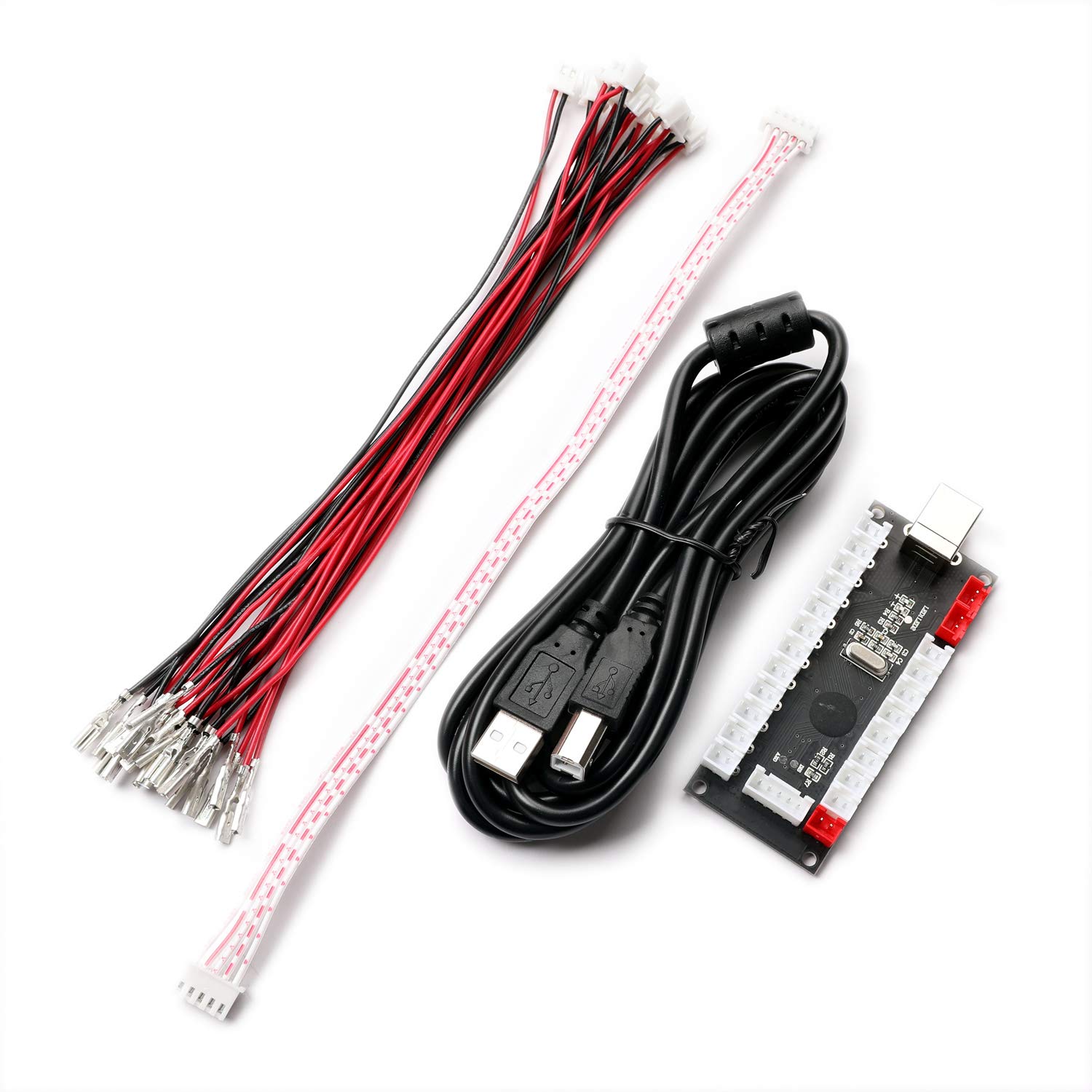
- Includes encoder board, USB cable, joystick cables, and button cables